MeistarPro app for workers (Android)
Workers start a shift on site with GPS, send a finished stage for review with a photo and see their hours and pay. Managers use the same app to accept work, approve advances and close forgotten shifts.
For workers: everything on their phone
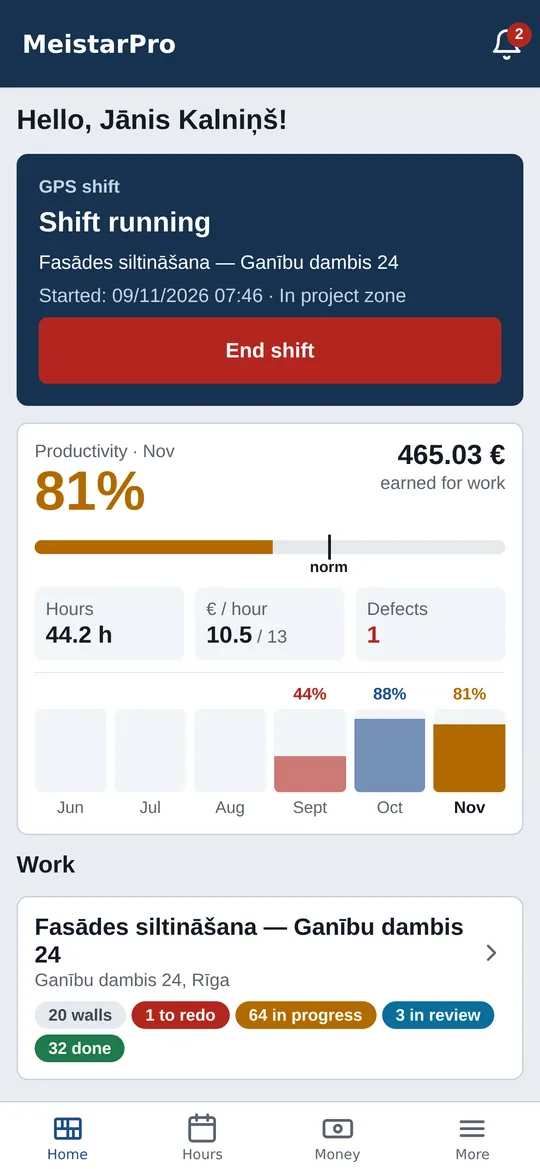
Four tabs at the bottom — Home, Hours, Money, More. No paper timesheet, no calls to the foreman.
GPS shift with geofence
Pick the project and start the shift once on site. While the shift is open the manager sees the worker under «On shift today».
My work and stages
Project → walls → my stages with status and my share in euros. «Send for review» needs a photo and a comment.
Hours
Monthly summary: total hours, working days, GPS hours, overtime and daily entries with from–to times.
Pay and advances
Six months of pay with a breakdown: piecework, hours, extra work, advances, bonuses, deductions. Advance requests and their status.
Tools by QR
What I have and what is being handed to me. QR scanner, return with a photo or mark as damaged with a comment.
Extra work
Work outside the estimate: project, description, date, hours and at least one photo. The manager approves or rejects with a reason.
For managers: decisions from the site
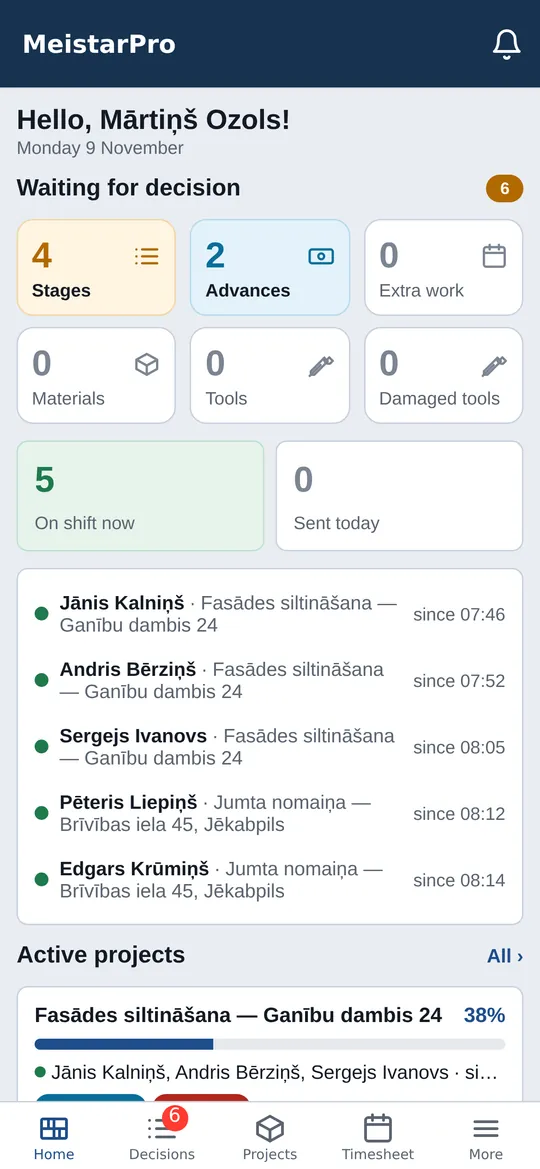
Same app: after login the role decides the screens. Managers get Home, Decisions, Projects, Timesheet, More.
One decisions list
Stages for review with photos — Accept or Defect with a reason. Advances, tool and material requests.
Who is on shift
Who is working, on which project and since when; projects with no photos or hours for three days.
Projects and progress
Active projects with % (accepted euros vs plan), stages under review and last activity.
Daily timesheet
All workers, GPS shifts and manual hours, violations. Close a forgotten shift, correct hours.
Receipt by photo
Photograph a receipt — AI reads the amount, supplier and date; check it and assign it to a project's expenses.
Open in the panel
For estimates, acts and payroll — one tap opens the full web panel already signed in, via a one-time link.
Offline and notifications
Sites do not always have internet. Sending a stage with a photo, extra work and returning a tool are kept on the phone in a «Waiting to send» queue and go out by themselves once the network is back or the app is opened. If the server rejects an entry, it stays in the list with the reason — retry or delete it.
A GPS shift cannot be started offline — the server checks place and time at that moment, otherwise tracking would not be fair. While a shift is open the app shows a permanent «shift active» notification and sends the location (about every 2 minutes); after the shift ends it stops.
Push notifications: accepted stage or defect, advance decisions and other events. Updates mostly arrive by themselves, without a new APK.
Getting started
The manager adds the crew
In the MeistarPro panel, under «People», create worker accounts and assign them to projects.
Install the app
Open the APK link on the phone and allow installing from this source. On iPhone MeistarPro opens in the browser and can be added to the home screen.
Sign in and work
Sign in with username or email and password (2FA supported). Language: Latvian, Russian or English.
Frequently asked questions
Is the app on Google Play?
Does the app track workers all the time?
Does the app work offline?
Is there an iPhone version?
How much does the app cost?
Give your crew the app
Create a MeistarPro account, add your workers and send them the APK link. 14 days free.